Trust Panel Embed#
<surface-trust-panel> is a dependency-free, read-only web component that renders a derived trust report so a viewer can inspect claims, evidence, freshness, and transparency gaps before relying on them. It is the reference implementation of the Minimum Trust Panel disclosure baseline for derived reports.
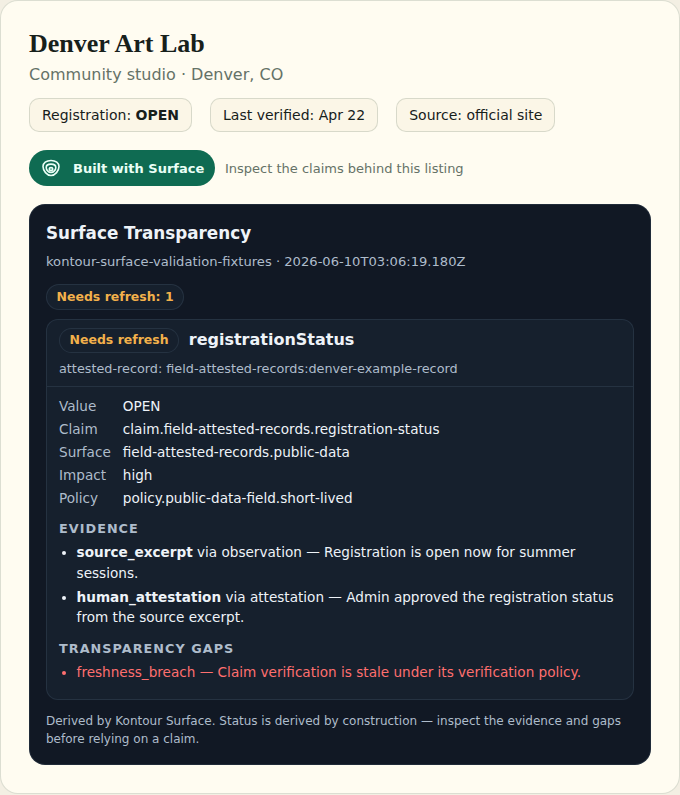
Here is the intended integration, end to end: a product listing shows the Built with Surface badge as the entry point, and the embedded panel discloses — claim by claim — that the registration status was verified from a source excerpt and a human attestation, but needs refresh because its 14-day freshness window expired:
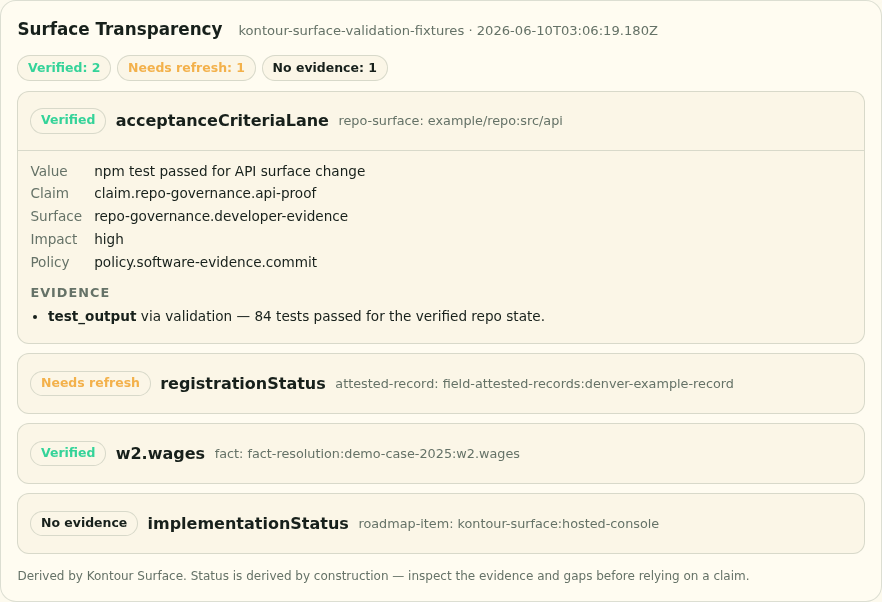
Try it without installing anything in the hosted Trust Snapshot Viewer — reports are parsed entirely in the browser and never leave the page.
Embed it#
The component is authored in TypeScript (src/trust-panel/surface-trust-panel.ts) and compiles to a single standalone script with no dependencies and no module loader. It ships in the npm package — copy or serve it from there and load a derived report:
cp node_modules/@kontourai/surface/dist/src/trust-panel/surface-trust-panel.js public/
<script type="module" src="surface-trust-panel.js"></script>

<!-- Fetch a report by URL -->
<surface-trust-panel src="./report.json"></surface-trust-panel>

<!-- Or assign the report object directly -->
<surface-trust-panel id="panel"></surface-trust-panel>
<script type="module">
  document.getElementById("panel").report = myTrustReport;
</script>

<!-- Override the panel heading to match your product's voice -->
<surface-trust-panel src="./report.json" heading="Why you can trust this listing"></surface-trust-panel>
The compiled file is a self-contained ES module with no imports, so type="module" is the only loading requirement.
Basis mode#
The same compatibility element also renders the Surface Basis Viewer. Set a projection directly, or select Basis explicitly for src content. The element does not infer mode from an input shape.
<surface-trust-panel id="basis" mode="basis"></surface-trust-panel>
<script>
  document.querySelector("#basis").basisProjection = projection;
</script>
Basis mode always shows standing and gaps. Assessment is expanded; context, relationships, and technical identities use native collapsed disclosures. Its stable parts include panel, header, title, standing, gaps, assessment, evidence, context, relationships, technical, empty, error, and footer.
The input is the output of surface report or buildTrustReport — a derived TrustReport, not a raw TrustBundle. If the JSON has claims but no derived statuses, the panel says so instead of guessing.
What it renders#
A summary header with the report source and generation time. The heading defaults to "Surface Trust Panel"; set the
headingattribute to use your own copy.Status chips with plain-language labels (
verified→ "Verified",stale→ "Needs refresh",unknown→ "No evidence"), drawn with Kontour UI's shared trust-state chip: every status has its own label, glyph, and colour, and a line style (solid, dashed, dotted, or double) that does not rely on colour, so a claim that was never checked can never read like one that was verified. The summary row shows one chip per status with its claim count beside it.Each status chip sits in a
standingpart: a wrapper element that carriesdata-kind(positive,caution,negative, orneutral) and contains only the chip, whose root is.trust-statewithdata-trust-state(the status, for the nine trust statuses). Style or select the status band on thestandingpart, and the specific status on[data-trust-state]inside it.One expandable row per claim: subject, asserted field and value, impact, policy, the evidence items behind it, and any transparency gaps, color-coded by severity.
Per evidence item, the state a reader needs in order to judge it — not just its type, method and summary:
- Support strength — "Entails the claim", "Cited only", or "Support strength not stated". Evidence that is merely cited is not evidence that establishes the claim.
- Result — "Passed", "Failed", "Failed — blocking", or "Not evaluated". Absent
passingis reported as not evaluated; it is never rendered as a pass. - Visibility — the producer's disclosure state from
metadata.visibility(ormetadata.disclosure.visibility), per Disclosure Requirements. Undeclared visibility says so rather than implying "public", because private, redacted, permissioned and unavailable evidence must not read as missing. - Integrity — the
integrityAnchor's kind andverificationStatuswhen one is supplied, so an anchor that failed verification does not render like one that passed. - Observed time, always, or "Observed time not supplied".
Each row also carries
data-support,data-result,data-blocking,data-visibilityanddata-integrityattributes for host styling and for tests. This is the Minimum Trust Panel §Required Sections 3 baseline: "evidence summary, type, method, source, observed time, result when supplied, and visibility state".
Theming#
The panel inherits the host page through CSS custom properties with built-in fallbacks: --k-text, --k-text-muted, --k-panel, --k-panel-raised, --k-line, --k-positive, --k-caution, --k-negative, and --k-font-ui. Pages already using Kontour design tokens get a native look with no extra work; any other page can set those properties on the element.
Status chips read Kontour UI's trust-state tokens: --k-trust-<status> (ink), --k-trust-<status>-fill, and --k-trust-<status>-line for each of the nine statuses, plus the chip's spacing and type tokens (--k-space-1, --k-space-2, --k-space-5, --k-text-xs, --k-text-sm, --k-font-mono, --k-radius-sm, --k-border-thin, --k-border-thick, --k-leading-tight, --k-leading-normal, --k-tracking-wide, --k-line-strong). Their fallbacks are Kontour UI's light-mode values, so chips stay legible on any page; a page that loads @kontourai/ui/tokens gets its own light or dark chips.
Boundaries#
The panel displays derived trust state; it never re-derives, scores, or mutates it. Producer-specific vocabulary and actions belong to the product embedding the panel — see Producer Extension Limits. For an operator workspace rather than a viewer surface, use the Surface Console.