Surface Console
Surface ships a local Surface Console server for any producer that emits a Surface-format run snapshot. The current CLI, routes, and generated assets still use console; treat that as an implementation name, not product language.
Quick start
From a Builder or producer project directory:
npx surface consoleThe Surface Console reads .surface/runs/latest.json by default. The server reads the file fresh on every request, so no restart is needed when the producer writes a new run.
Pass a custom path or port explicitly:
surface console --read-model .surface/runs/latest.json --port 4242Or use a config file:
{
  "port": 4242,
  "readModelPath": ".surface/runs/latest.json",
  "vocab": {
    "projectName": "My project",
    "projectKind": "repo governance"
  },
  "theme": {
    "brandName": "Veritas"
  }
}
surface console --config surface.config.jsonMerge multiple producer bundles into one view
surface console also accepts repeatable --input bundle paths, mirroring surface report --input. This is additive to --read-model: any --input switches the console onto a merge-and-project path. With more than one input the console validates each producer bundle, merges them order-independently (mergeBundlesDetailed), and projects the merged ledger into the read model. Each input bundle is watched, so editing any producer bundle refreshes the view live.
npx surface console \
  --input examples/console-multi-producer/ci-producer.bundle.json \
  --input examples/console-multi-producer/review-producer.bundle.json \
  --input examples/console-multi-producer/security-producer.bundle.json
The merged view adds two multi-producer affordances:
- Producer attribution. Every claim card names the producer(s) that asserted it, built from each input bundle's optional
producerId(falling back tosource). An identical shared claim contributed by several producers dedups to one card that still lists all of them. Because a merged bundle never carries a top-levelproducerId(merge.md§5 rule 3), attribution is carried as projection metadata keyed by claim id, built during the merge step — not read back off the merged bundle. - Merge collisions. Same claim id, different content across producers is surfaced in a dedicated "Merge collisions" section that names the colliding producers. The lexicographically-first content is kept and every losing record is reported there, never silently dropped (
merge.md§6). Theexamples/console-multi-producer/demo ships a build-digest collision between the CI and security producers.
Implementation note: surface console, *.console.json, /console.js, and /console.css are current implementation names. Product-facing language should describe the Operator experience as the Surface Console.
Developer map
Surface keeps its own standalone Surface Console. Keep product-specific trust behavior in this repo, and use Kontour UI only as the shared presentation system across Kontour products.
| Area | Location | Purpose |
|---|---|---|
| CLI command | src/cli.ts, src/commands/console.ts | Parses surface console flags and starts the local server. |
| Local server and API routes | src/console/server.ts | HTTP transport only: routing, SSE, and request/response mechanics. Delegates domain orchestration to the runtime. |
| Console runtime | src/console/runtime.ts | SurfaceConsoleRuntime owns read-model loading, run catalog, projection creation, HTML assembly, and Claim Package authoring — usable without starting an HTTP server. |
| Projection contract | src/console/projection.ts, src/console/claim-detail-projection.ts, src/console/types.ts | Converts producer read models into the UI shape consumed by the Console, including the per-claim detail projection (guidance, gap labels, policy facts, integrity scope) the browser renders from. |
| Standalone UI shell | src/console/shell.ts | Owns the dependency-free HTML shell served by /. |
| Standalone UI asset sources | src/console/client/parts/, src/console/styles/parts/ | Owns the editable browser behavior and Kontour UI-compatible token aliases for the standalone Surface Console. |
| Generated UI asset constants | scripts/build-console-assets.mjs, src/console/client/index.js, src/console/styles/index.css, src/console/assets.generated.ts, src/console/script.ts, src/console/styles.ts | Concatenates ordered client and CSS parts, then converts JS/CSS assets into TypeScript constants consumed by /console.js and /console.css; regenerate with npm run build:console-assets. |
| Browser coverage | tests/browser/console.spec.ts | Starts bin/surface.mjs console and verifies the real standalone page on desktop and mobile. |
| Docs-site Kontour UI assets | scripts/sync-ui-assets.mjs, docs-site/vendor/kontourai-ui/ | Copies token CSS from the installed public @kontourai/ui package for generated docs pages. |
| Package boundary guard | tests/package-files.test.ts, scripts/check-package-contents.mjs | Keeps Kontour UI dev-only, prevents React/runtime leakage, and verifies published package contents. |
Run directory convention
Producers write one file per run:
.surface/runs/
  <run-id>.console.json   # full read model for that run
  latest.json               # index → { latestRunId, readModelPath }
latest.json is either a full read model or an index pointer. If it contains kind: "surface-console-index" and a readModelPath, the server resolves the model from that path relative to the repo root. Otherwise it uses the file directly.
Run history
When multiple *.console.json files exist in the run directory, the Surface Console toolbar shows a run picker that lets you compare runs without restarting the server.
The /api/runs endpoint returns a sorted list of available runs:
GET /api/runs
→ [{ runId, generatedAt, claimCount, verifiedCount, attentionCount, fileName }, ...]
Select a specific run by appending ?run=<runId> to the /api/read-model endpoint, or by using the run picker in the UI.
Surface Console features
Metric chips
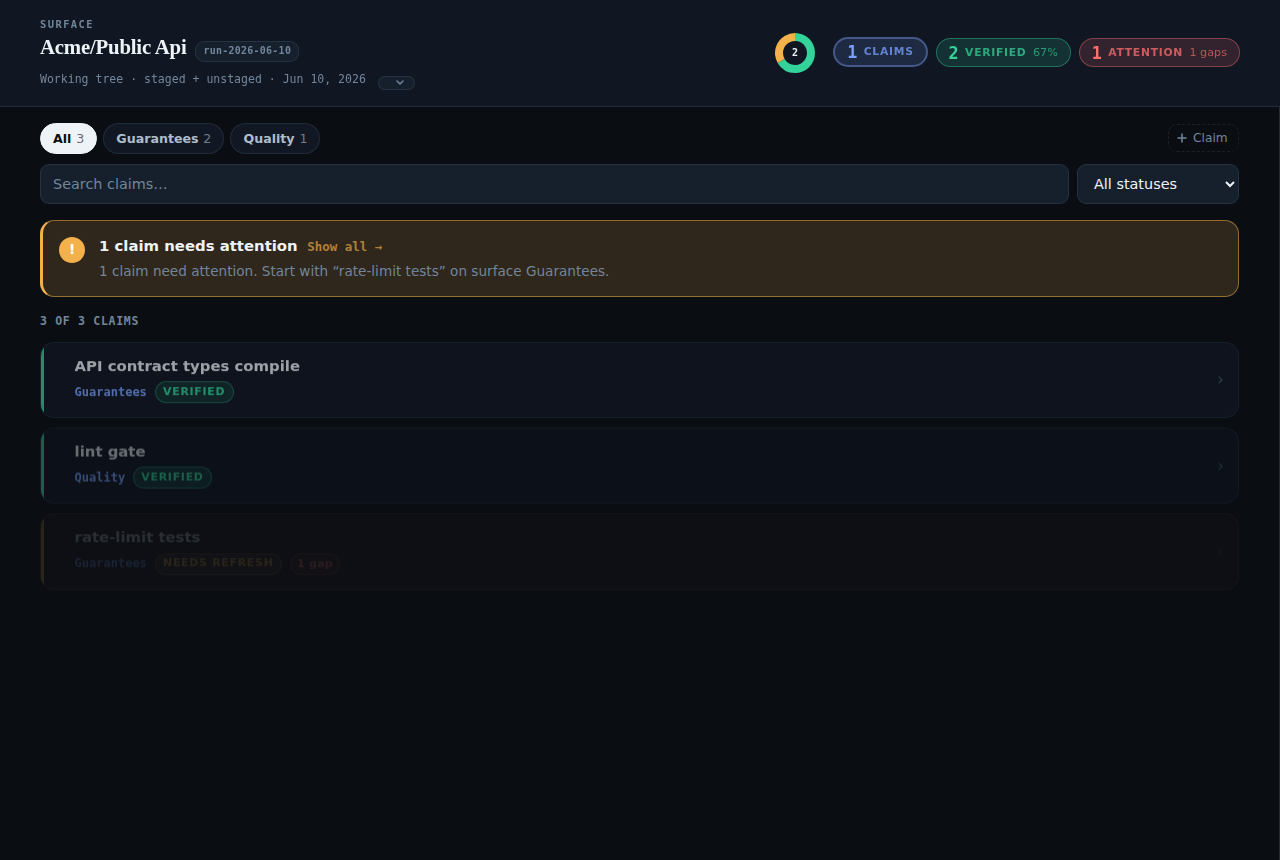
The header row shows summary chips for total claims, verified count, and attention count. Each chip is clickable and filters the claim list to matching claims. The active filter is highlighted with a raised border; clicking again clears it.
Claim feed
Each claim card shows:
- Claim ID and surface path
- Human-readable status label: Verified, Needs refresh, Disputed, Rejected, No evidence, Pending
- Impact level badge
- Policy ID when present
Master-detail layout (desktop)
On viewports wider than 900 px the Surface Console uses a sticky side panel instead of a modal overlay. Clicking a claim slides the detail panel in from the right without covering the claim list. The list and panel are visible simultaneously.
Claim detail
The detail panel shows evidence, events, policy context, and integrity scope for the selected claim. The integrity scope is where producers can expose what a verified claim is anchored to: a source revision, working-tree digest, file fingerprints, or producer configuration hashes. For claims that are not yet verified, the panel shows contextual guidance describing what is needed to reach the verified state.
Evidence summary is the human-readable producer summary. Observed result is reserved for structured runtime output such as a pass/fail result, command, exit code, stdout, or stderr. If a producer only supplies a summary, the Surface Console does not duplicate it as an observed result.
Eval summary
When a producer runs an eval cycle (e.g., via veritas eval record), it can write a generic EvalSummary into the run snapshot. The Surface Console uses this to show post-hoc review context alongside the live trust state.
EvalSummary shape (see src/types.ts):
interface EvalSummary {
  reviewed: boolean;
  reviewedAt?: string;
  confidence?: "low" | "medium" | "high";
  outcome?: "accepted" | "accepted-with-changes" | "rejected";
  falsePositiveCount?: number;
  missedIssueCount?: number;
  timeToResolutionMinutes?: number;
  notes?: string[];
  metadata?: Record<string, unknown>;
}
This is a producer-agnostic shape. Producers may put domain-specific fields under metadata.
API reference
| Route | Method | Description |
|---|---|---|
/ | GET | Surface Console HTML shell |
/api/read-model | GET | Current (or ?run=<id>) read model JSON |
/api/console-model | GET | Current (or ?run=<id>) Surface Console projection |
/api/runs | GET | Sorted list of available run snapshots |
/api/claims | POST | Add a claim to the local claim store |
/api/claims/:id | PUT | Update a claim in the local claim store |
/api/claims/:id | DELETE | Remove a claim from the local claim store |
/console.js | GET | Compiled Surface Console script; current route name |
/console.css | GET | Surface Console styles; current route name |
Surface owns the Surface Console shell, status model, claim browser, and metadata drilldown. Producers own the read model and vocabulary that make the Console meaningful for their domain.