Getting Started#
This guide takes you from npm install to a complete, evidence-gated Flow Run — including a deliberate failure that routes work back, and a resume from recorded state. Every command and every output block below was produced by the real CLI.
Flow v0.1 is local and file-backed. Nothing here talks to a hosted service.
Install#
npm install -D @kontourai/flow
Requires Node.js 22 or newer.
1. Initialize the project#
npx flow init
initialized .flow
flow init scaffolds the local Flow layout:
.flow/
├── README.md                          # what lives here and why
├── config.json                        # project authority: trusted producers, gate overrides
├── definitions/
│   └── agent-dev-flow.json            # bundled sample definition

.kontourai/flow/
└── runs/                              # one directory per generated Flow Run
Shortcut:
npx flow init --demoadditionally scaffolds a ready-made run nameddemo— plan gate already passed, sitting atimplement— soflow status demo,flow resume demo, andflow console --run demohave something real to show immediately.
The sample definition models the first-wedge agentic development path — plan → implement → verify → publish — with a gate on each working step. Open .flow/definitions/agent-dev-flow.json and look at one gate:
{
  "plan-gate": {
    "step": "plan",
    "expects": [
      {
        "id": "acceptance-criteria",
        "kind": "trust.bundle",
        "required": true,
        "description": "Acceptance criteria are ready for implementation.",
        "bundle_claim": {
          "claimType": "builder.acceptance",
          "subjectType": "flow-step",
          "subjectId": "builder.plan",
          "accepted_statuses": ["verified", "assumed"]
        }
      }
    ]
  }
}
This is the core idea: the gate declares what evidence it expects in a typed shape, before any work runs. An agent cannot satisfy this gate by summarizing; it has to attach evidence that matches.
2. Start a run#
A Flow Run is one execution of a definition for a concrete piece of work:
npx flow start .flow/definitions/agent-dev-flow.json \
  --run-id dev-1847 --params subject=feature-search-filters
started flow run: dev-1847
current step: plan
report: .kontourai/flow/runs/dev-1847/report.md
Flow snapshots the definition and creates the authoritative run state:
.kontourai/flow/runs/dev-1847/
├── definition.json        # normalized definition snapshot from run start
├── state.json             # authoritative mutable run state
├── evidence/manifest.json # evidence index
├── report.md              # regenerated human-readable report
└── report.json            # regenerated machine-readable report
state.json is the continuation authority. Reports and console views are derived explanations — they are never the source of truth for gate evaluation or resume.
3. Attach evidence and evaluate#
The plan gate expects a builder.acceptance claim. Create a small trust bundle that carries it — in a real team this is produced by a reviewer, a CI job, or a Veritas check rather than written by hand:
cat > acceptance-bundle.json <<'EOF'
{
  "schemaVersion": 5,
  "source": "team/reviewer",
  "claims": [
    {
      "id": "claim.builder.acceptance",
      "subjectType": "flow-step",
      "subjectId": "builder.plan",
      "facet": "builder.acceptance",
      "claimType": "builder.acceptance",
      "fieldOrBehavior": "acceptanceCriteria",
      "value": "acceptance criteria reviewed and confirmed",
      "createdAt": "2026-06-10T00:00:00.000Z",
      "updatedAt": "2026-06-10T00:00:00.000Z"
    }
  ],
  "evidence": [
    {
      "id": "evidence.builder.acceptance",
      "claimId": "claim.builder.acceptance",
      "evidenceType": "human_attestation",
      "method": "attestation",
      "sourceRef": "team:reviewer",
      "excerptOrSummary": "Acceptance criteria reviewed and confirmed.",
      "observedAt": "2026-06-10T00:00:00.000Z",
      "collectedBy": "team/reviewer"
    }
  ],
  "policies": [],
  "events": [
    {
      "id": "event.builder.acceptance.verified",
      "claimId": "claim.builder.acceptance",
      "status": "verified",
      "actor": "team/reviewer",
      "method": "attestation",
      "evidenceIds": ["evidence.builder.acceptance"],
      "createdAt": "2026-06-10T00:00:00.000Z",
      "verifiedAt": "2026-06-10T00:00:00.000Z"
    }
  ]
}
EOF

npx flow attach-evidence dev-1847 --gate plan-gate \
  --file ./acceptance-bundle.json --kind trust.bundle
attached evidence: ev.1781101620469.1
gate: plan-gate
kind: trust.bundle
The file is copied into .kontourai/flow/runs/dev-1847/evidence/ and indexed in the manifest — the run directory stays self-contained even if the original file changes or disappears. Now evaluate:
npx flow evaluate dev-1847
pass plan-gate: Acceptance criteria are ready for implementation. satisfied
current step: implement
next action: attach evidence for implementation gate
The gate passed, so the run advanced to implement. Check status at any point:
npx flow status dev-1847
flow run: agent-dev-flow / feature-search-filters
current step: implement

PASS  plan gate: Acceptance criteria are ready for implementation. satisfied
WAIT  implementation gate: implementation gate waiting
WAIT  verify gate: verify gate waiting

next action: attach evidence for implementation gate
continuation: resume from implement, not chat memory
report: .kontourai/flow/runs/dev-1847/report.md
4. Fail a gate and watch route-back#
Attach the implementation evidence the same way (a implementation.scoped-diff claim), evaluate, and the run reaches verify. Now suppose the test suite fails. Attach the failing output as evidence with a route reason:
npx flow attach-evidence dev-1847 --gate verify-gate \
  --file ./test-output.json --kind command \
  --status failed --route-reason implementation_defect

npx flow evaluate dev-1847
route-back verify-gate: verify gate has failing evidence
current step: implement
next action: return to implement and replace failing evidence attempt 1/3
The verify gate's on_route_back map says implementation_defect returns to implement, and its route_back_policy caps attempts at 3. The failure is not hidden, not retried silently, and not summarized away — it is a recorded transition with a reason, an attempt count, and a budget. See Gates & Route-Back for the full rules.
5. Resume from recorded state#
This is the part that survives context compaction, session handoff, and "the agent forgot what it was doing":
npx flow resume dev-1847
flow run: agent-dev-flow / feature-search-filters
current step: implement
next action: return to implement and replace failing evidence attempt 1/3
open gates: implement-gate
accepted exceptions: none
route backs: verify-gate implementation_defect -> implement attempt 1/3, limit exceeded no
guidance: continue from recorded Flow state; return to implement and replace failing evidence attempt 1/3
flow resume reads only the run directory. Any agent, teammate, or automation that can read these lines knows exactly where the work stands and what to do next — no chat history required.
6. Inspect the run in the local console#
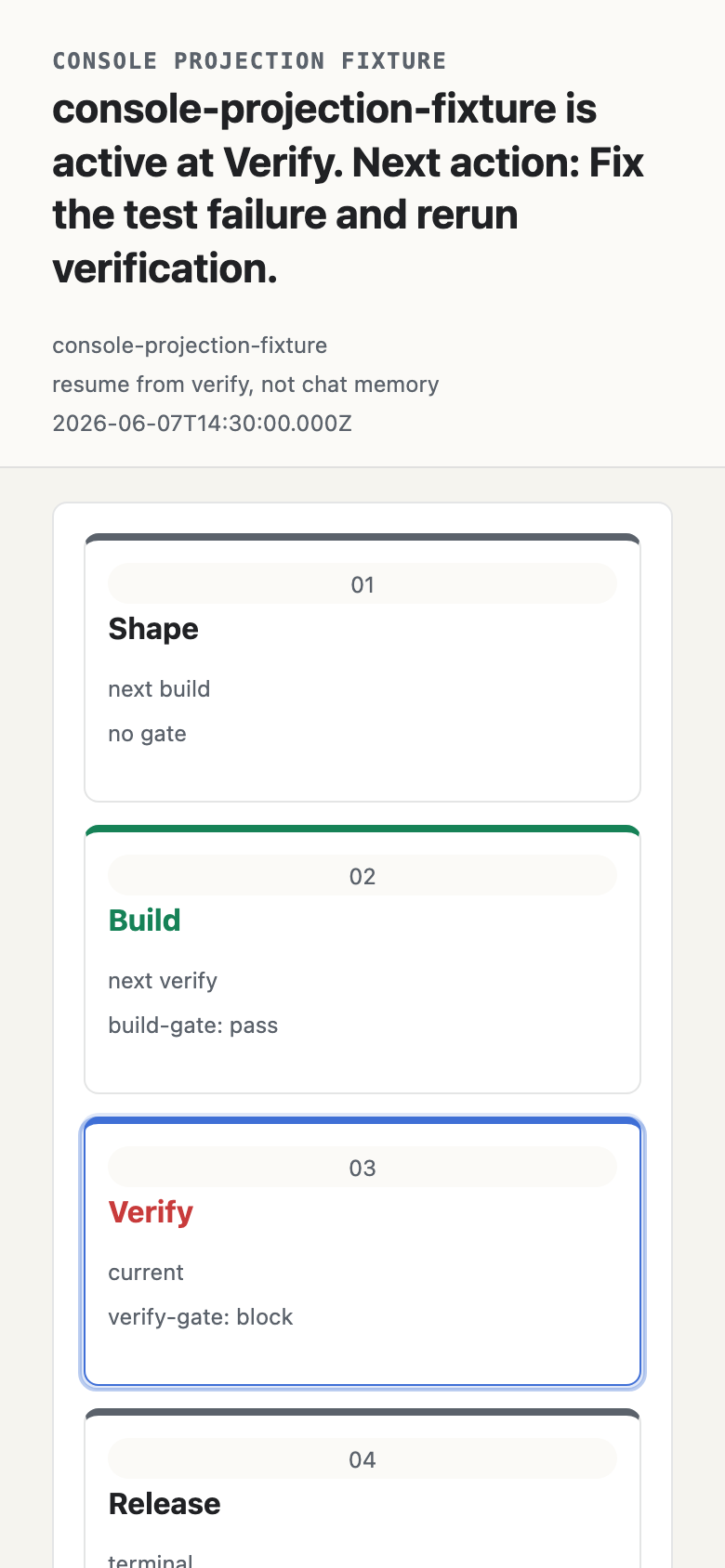
npx flow console --run dev-1847
The console is loopback-only and read-only. It serves the process graph, transition timeline, gate details, evidence, and links — all projected from the same local run files.
Exceptions: advancing anyway, on the record#
Sometimes the right call is to proceed without the expected evidence — a hotfix, an unavailable system, a judgment call. Flow makes that explicit instead of silent:
npx flow accept-exception dev-1847 --gate verify-gate \
  --reason "browser evidence unavailable in CI; verified manually on staging" \
  --authority "brian@kontour.ai"
An accepted exception counts as a pass, and it is permanently recorded in the run state and every report — what was skipped, why, and on whose authority.
Where to go next#
- Use Cases — realistic team scenarios with definitions you can copy.
- Agent Hooks — make agents unable to stop or push while gates are open.
- Evidence — evidence kinds,
trust.bundleexpectations, trust artifacts, and diagnostics. - Gates & Route-Back — the complete evaluation and routing rules.
- CLI Reference — every command, flag, and format.